Saturday, 14 June 2008

User Acceptance Testing - the Key to Surviving an ERP Go Live

This posting was first published on the Intergen Blog Site on the 12th June.

When I came to New Zealand, nearly six years ago, I wanted to throw myself off a bridge with some elastic tied to my legs. I had heard that this was something Kiwis did and I wanted to fit in to my newly adopted environment. The world’s first commercial bungy jump started in the mid ‘80s in Queenstown, New Zealand. And it was there, on the Kawarau Bridge, that I took the plunge in 2002.

It was frightening but totally worth it. I knew it was safe but that didn’t stop me from being absolutely terrified. Sometimes in life, no matter how scared you are, you need to take a leap of faith. 5, 4, 3, 2, 1, bungeeeeeeeeey!

There are some similarities between bungy jumping and going live with an ERP solution and it was thinking about those similarities that inspired me to write this piece. Don’t panic, I’m not going to try and contort what I have to say about the ERP go live process to be all about bungy jumping using some clever metaphors. If, however, you do find yourself standing on the edge of an ERP implementation, you should read this article before jumping head first.

First of all, let’s consider the timing of the go live. How do you know when an ERP implementation is ready to go live? Is it when you have run out of time, or money? Often those, or some other seemingly arbitrary factor, are the main reasons for deciding on a go live date, but are you really ready to go live and how do you know?

The Six Ps
Like many things in life, prior preparation prevents pretty poor performance. In the case of an ERP implementation, the preparation comes in the form of user acceptance testing (UAT). User acceptance testing is often used as a project milestone for contractual reasons; completing UAT signifies that the solution has reached an acceptable level of stability and this in turn can be linked with the issue of who is going to pay for fixing defects. UAT is actually far more important than that — it is your key to project success. Imagine being the first person to bungy jump from the Kawarau Bridge. You’re standing 43 metres above the river with a bungy cord around your legs. Are you going to jump because you believe it should work in theory? I think not. Before you jump you’re going to do a little testing first: maybe throw a crash test dummy off the bridge to see if the harness holds, to ensure the rope is the right length. It’s important to iron out the issues in a safe environment first, and for an ERP implementation the safe environment is UAT.

Every issue that is found during UAT is one less issue that will need to be solved after go live, and the thing about go live issues is they can be really dangerous. When an issue occurs in a production system in a go live environment, it needs to be fixed quickly, and there is typically a great deal of stress associated with the issue. Being hurried in a stressful environment does not make for good programming and it certainly doesn't allow for well thought out design.

In order to avoid this stressful and potentially business-damaging situation you must start your preparation early, but what exactly is UAT. And, more specifically, what should you be testing?

Test the Entire Solution
In UAT, you are trying to simulate your go live situation. The closer you can get your UAT environment to your go live environment, the more confident you will be that you’re going to survive. Here’s a list of some of the things you need to be testing:

  • The configuration of the production server hardware and server component installation, such as database, application server, SharePoint server, IIS, report server.

  • The ability to install client software. It may be that you have a dedicated set of machines for the users to perform UAT, but if you are planning on installing client software as part of your go live, you should be testing your installation procedures by installing some software on some client machines that will be used for the testing. Go live day is not the day to hear, “Well it worked in the testing room - what’s different?”

  • The configuration of your production ERP environment. The testing must be performed using the system with configuration settings as they will be in the live environment. It is inevitable that you will need to make some configuration changes during UAT in order to resolve issues; however, you must ensure that the same changes are logged and applied to the live environment. And you should also be aware that any change in configuration could invalidate all testing that has been completed so far.

  • The data conversion process. Your data conversion process needs to be repeatable; you need to be able to extract the data to be converted consistently, hopefully using programs or scripts with a minimum amount of manual manipulation. The import of the data must obviously be done through dataports or other programs and the UAT is where you will test the success of those procedures. If you make changes to your data as a result of issues found during testing, you should ensure you can repeat this when you do go live and document the changes to the data conversion process.

  • The modifications that have been made to the system: the new reports, forms, codeunits and external programs, interfaces, and reports all need to be tested. All too often this is the only thing that is covered in UAT. Once again, corrections may mean that previously accepted tests need to be re-tested. This is known as regression testing—it’s not what you fixed that’s important, it’s the things you broke along the way that you need to be aware of.

  • The configuration of security privileges. This is to ensure that users can perform the tasks they need to perform without getting error messages and also to ensure that users do not have access to the data that they are not privileged to see.

Plan your testing and test your plan
The only way to have a successful UAT is to write down what you plan to test and record the issues you have found when they are tested. When you need to make the decision to go live or not, you will want to see the list of business process with lots of little ticks against them showing that they have been successfully performed. Remember the problem of regression testing: when you make a change to configuration, data conversion, or programming, you may as well erase all the ticks you have so far – it’s not what you fixed that’s important, it’s what you may have broken. If there are issues, you want to know what they are before you go live; it’s OK to go live with issues, it’s just important to know beforehand they are there and to have taken an informed decision.

When it comes to preparing test cases—well that’s another posting in its own right. Maybe one of our QA team can offer some advice in that area.

Get Some Help
If you have done your job properly, the go live should be painless. There may be a few surprises, but by and large you’ll be going live knowing that the critical things are going to work. It’s important to have good people around to help you through the go live process. When you’re standing on the platform with your towel wrapped tightly around your ankles, gazing at the horizon, it’s good to know that if you do freeze up, one of the professionals stood behind you is going to be quite happy to give you a little push.

Sunday, 25 May 2008

Fast SQL Copy for Employee Portal

Recently I wanted to copy the contents of my Employee Portal setup from one company to another and then eventually from my test system to my live system. Now I know I could probably do this with a dataport and, to be honest, I did try that but something didn’t quite work. I probably made a silly mistake, but it did inspire me to create a SQL stored procedure to do the job for me.

This stored procedure uses the INFORMATION_SCHEMA in SQL to find the field names of any matchining tables and creates some SQL for me to execute. For safety, I only generate the SQL and do not execute it, giving you a change to change your mind if you don’t like what it is about to do.

The really neat trick is the fact that it will handle fields with an AutoIncrement property set in NAV.

I adapted this from a similar stored procedure I created a while ago that would copy all tables from one company to another which is considerably faster than the NAV backup/restore. For Employee Portal tables I am just assuming they start with ‘EP’ – another good reason to inspect the generated SQL before you execute it.

If you use this code and destroy anything, you only have yourself to blame and I will take no responsibility. This code is posted here “as is” for the sake of sharing knowledge and I will not be held responsible for any loss of data or hair that may result from running it.

Here’s the code...

IF EXISTS (SELECT * FROM sysobjects WHERE id = object_id(N'[dbo].[NAV_EP_Copy]') AND OBJECTPROPERTY(id, N'IsProcedure') = 1)
BEGIN
DROP PROCEDURE dbo.NAV_EP_Copy
END
GO

CREATE PROCEDURE [dbo].[NAV_EP_Copy]
@SourceCompany varchar(31),
@TargetDatabase varchar(31),
@TargetCompany varchar(31)
AS

--Version 2 - added target database and row count checks

DECLARE @SourceTableName varchar(100), @TargetTableName varchar(100)
DECLARE @TmpColumnName varchar(30), @TmpColumnType varchar(100)
DECLARE @SQLStr1 varchar(8000), @SQLStr2 varchar(8000), @SQLStr3 varchar(8000), @Values varchar(8000)
DECLARE @Identity int
DECLARE @ErrorCount int, @Debug int

SET @Debug = 1
SET @ErrorCount = 0

IF @Debug = 0 BEGIN
PRINT 'Copying NAV Employee Portal'
PRINT ''
PRINT ' From ' + @SourceCompany
PRINT ' To ' + @TargetDatabase + ' ' + @TargetCompany
PRINT ''
PRINT ''
END

IF SUBSTRING(@SourceCompany,LEN(@SourceCompany),1) <> '$' BEGIN
RAISERROR('Source Company Name must use SQL name (replace chars with underscore) and end in $.',1,1)
SET @ErrorCount = @ErrorCount + 1
END


IF SUBSTRING(@TargetCompany,LEN(@TargetCompany),1) <> '$' BEGIN
RAISERROR('Target Company Name must use SQL name (replace chars with underscore) and end in $.',1,1)
SET @ErrorCount = @ErrorCount + 1
END

-- Debug mode does not do anything other than generate messages so who cares if there is data there alredy.
EXEC('set nocount on select top 1 1 from [' + @TargetDatabase + '].[dbo].[' + @TargetCompany + 'EP WP Request Table Tab'+']')

IF (@@rowcount > 0) BEGIN
IF @Debug <> 1 BEGIN
RAISERROR('Target EP WP Request Table Tab table has data.',1,1)
SET @ErrorCount = @ErrorCount + 1
END ELSE BEGIN
PRINT '***** WARNING *****'
PRINT 'Target EP WP Request Table Tab table has data.'
PRINT 'Executing these commands will delete that data.'
PRINT ' '
PRINT 'Data Loss May Occurr.'
PRINT '***** WARNING *****'
PRINT ' '
END
END

IF @ErrorCount > 0 GOTO ENDHERE

DECLARE srcTable CURSOR FOR
SELECT TABLE_NAME FROM INFORMATION_SCHEMA.TABLES
WHERE TABLE_NAME LIKE(@SourceCompany+'EP%')

OPEN srcTable

FETCH NEXT FROM srcTable INTO @SourceTableName
WHILE @@FETCH_STATUS = 0 BEGIN

SET @TargetTableName = @TargetCompany+SUBSTRING(@SourceTableName,LEN(@SourceCompany)+1,100)
SET @SQLStr1 = ''
SET @SQLStr2 = ''
SET @SQLStr3 = ''
SET @Values = ''

IF (SELECT COUNT(*) FROM INFORMATION_SCHEMA.COLUMNS WHERE COLUMNPROPERTY(OBJECT_ID(TABLE_NAME),COLUMN_NAME,'IsIdentity')=1 AND TABLE_NAME = @SourceTableName) > 0 BEGIN
SET @SQLStr1 = 'SET IDENTITY_INSERT [' + @TargetDatabase + '].[dbo].[' + @TargetTableName+ '] ON '
SET @Identity = 1
END

SET @SQLStr1 = @SQLStr1 + 'TRUNCATE TABLE [' + @TargetDatabase + '].[dbo].[' + @TargetTableName+ '] '

DECLARE srcColumn CURSOR FOR
SELECT COLUMN_NAME, DATA_TYPE FROM INFORMATION_SCHEMA.COLUMNS
WHERE TABLE_NAME = @SourceTableName

OPEN srcColumn

SET @SQLStr2 = @SQLStr2 + 'INSERT INTO [' + @TargetDatabase + '].[dbo].[' + @TargetTableName+ '] ('

FETCH NEXT FROM srcColumn INTO @TmpColumnName, @TmpColumnType

WHILE @@FETCH_STATUS = 0 BEGIN

SET @SQLStr2 = @SQLStr2 + ' ['+@TmpColumnName+']'

IF @TmpColumnType = 'timestamp'
SET @Values = @Values + ' NULL'
ELSE
SET @Values = @Values + ' ['+@TmpColumnName+']'

FETCH NEXT FROM srcColumn INTO @TmpColumnName, @TmpColumnType

IF @@FETCH_STATUS = 0 BEGIN
SET @SQLStr2 = @SQLStr2+','
SET @Values = @Values+','
END
END

SET @SQLStr2 = @SQLStr2 + ')'
SET @SQLStr3 = 'SELECT ' + @Values + ' FROM ['+@SourceTableName+'] '

CLOSE srcColumn
DEALLOCATE srcColumn

IF @Identity = 1 BEGIN
SET @SQLStr3 = @SQLStr3 + ' SET IDENTITY_INSERT [' + @TargetDatabase + '].[dbo].[' + @TargetTableName+ '] OFF '
SET @Identity = 0
END

IF @Debug = 1 BEGIN
PRINT @SQLStr1
PRINT @SQLStr2
PRINT @SQLStr3
END ELSE BEGIN
PRINT ''
PRINT '-------------------------------------------------------------'
PRINT @TargetDatabase + ' ' + @TargetTableName
EXECUTE ( @SQLStr1 + @SQLStr2 + @SQLStr3 )
END

FETCH NEXT FROM srcTable INTO @SourceTableName
END

CLOSE srcTable
DEALLOCATE srcTable

ENDHERE:

Monday, 12 May 2008

Where Am I? - Still Wondering.

Well I got the image problem sorted out thanks to a suggested from Vjeko. He said that I should open the image in Paint and re-save it as this has sorted a similar issue out for him in the past.

Well that didn't work, but...


What I did do was capture a screen shot of the icons and save those as a bitmap using a product called HyperSnaps and this imported into NAV fine and looks really nice.

Friday, 9 May 2008

Where Am I?

I was really inspired by Waldo’s blog posting on how to see which database you’re in. Take a look on Waldo's Blog if you haven’t seen it before. This is something that our users have been asking for since version 4.0 first did away with the old form-based menu system (something they could easily modify to show them if they were in the live or the test system.)

I really wanted to make a super-nice version of Waldo’s form but I came up short in a couple of areas. Who knows, maybe someone reading this blog will be able to offer some advice as to how to overcome the problems I found.

First of all, let me give you my requirements.

I want the system to provide immediate visual cues to show the users which database or company they happen to be in. The required information is to provide something eye-catching, to show a large bit of text (like “TEST SYSTEM”) and to provide the database name, company name and finally give me a big area where I can put a support message. Oh and one more thing: when I copy my database from the live system and restore it to my test database, I want the messages and visual cues to stay the same – that’s right, I don’t want to have to edit the data to make my test system say it’s the test system every time I restore it from the live backup.

The solution I came up with is pretty much based on Waldo’s solution so I’m not taking credit for this. I just figured, it would be nice to share this with anyone that’s interested and maybe someone with a bit more time can iron out the imperfections. I should also say that I only ever intended this to work with SQL databases so there’s no need to point out that this will not work with a native database.

Before we get stuck in to the How, let’s take a look at the solution I came up with. Like Waldo’s solution, I have some code in my CompanyOpen() trigger in codeunit 1 ApplicationManagement that will launch a form.

My form will look for details in the setup table matching the current company and database and if it doesn’t find a record, it creates one and displays the following image.
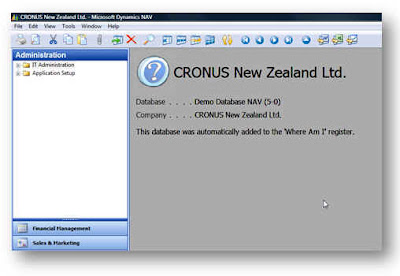


I then have a setup form that allows me to edit the info that’s going to be displayed.
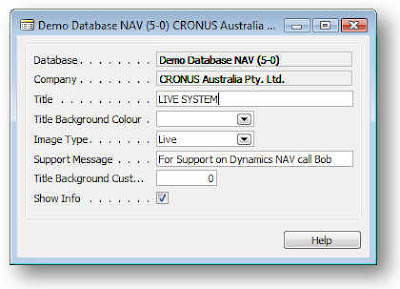


The Database and Company get filled in automatically. The Title field get’s displayed, the title Background Colour is an “unimplemented feature” :-)

The Image Type allows you to select from Live, Test and Unknown options which will show one of the following icons.
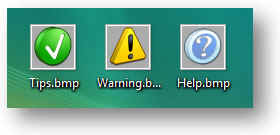


I downloaded these icons from http://tpdkcasimir.deviantart.com/ and made some adjustments to set the background colour to be the same as NAV’s background colour and resize them (when I say I did it, I mean someone with far more talent than me did it for me.)

Now this is where I hit the first weird NAVism – or maybe I was just doing something wrong. Whenever I put the icons on the form, they got stretched. Anyone know what I’m doing wrong? I thought at first that NAV had some kind of minimum size so I resized the Icons to fit the size of my NAV graphic and these got stretched again to look like this.
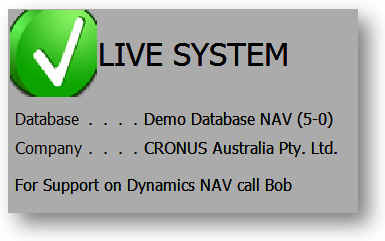


But at least you can see the idea – and the way the other data fields are being updated from the database.

The Support message appears at the bottom of the form, the Show Info tick allows you to suppress the message in certain company/database combinations – like maybe your live system. The custom background colour is another unimplemented feature.
I made a list form first and then decided a card form is a little easier to set up the data.

OK now let’s look at how I did this.

To start with, how am I going to solve the problem of my data not getting lost when I restore my live system? Well, there’s some other data that doesn’t get lost when you restore over your database in SQL and that’s the user license. The way the system keeps that is by storing it in a table called $ndo$srvproperty that lives in the master database. So I’m going to create a new table in the master database and use that to store details on my NAV databases/companies. Here’s the SQL to create the table and grant permission to public:

USE [master]
GO
/****** Object: Table [dbo].[IntergenNAVWhereAmI] Script Date: 05/09/2008 20:06:19 ******/
SET ANSI_NULLS ON
GO
SET QUOTED_IDENTIFIER ON
GO
SET ANSI_PADDING ON
GO
CREATE TABLE [dbo].[IntergenNAVWhereAmI](
[timestamp] [timestamp] NOT NULL,
[Database] [varchar](30) NOT NULL,
[Company] [varchar](30) NOT NULL,
[Title] [varchar](50) NOT NULL,
[Title Background Colour] [int] NOT NULL,
[Image Type] [int] NOT NULL,
[Support Message] [varchar](250) NOT NULL,
[Title Background Custom Colour] [int] NOT NULL,
[Show Info] [tinyint] NOT NULL,
CONSTRAINT [IntergenNAVWhereAmI$0] PRIMARY KEY CLUSTERED
(
[Database] ASC,
[Company] ASC
)WITH (PAD_INDEX = OFF, STATISTICS_NORECOMPUTE = OFF, IGNORE_DUP_KEY = OFF, ALLOW_ROW_LOCKS = ON, ALLOW_PAGE_LOCKS = ON) ON [PRIMARY]
) ON [PRIMARY]
GO
GRANT SELECT, DELETE, INSERT, UPDATE ON IntergenNAVWhereAmI TO PUBLIC
GO
SET ANSI_PADDING OFF


OK. So now we have a table we can work with. The next thing is that in each database I’m going to use this with, I’m going to need a view that references this table so NAV can access it via a linked table (you know that NAV can have linked tables that are based upon views which point to tables in other databases right?)

Here’s my code to create the view:

USE [Demo Database NAV (5-0)]
GO
/****** Object: View [dbo].[Intergen NAV Where Am I] Script Date: 05/09/2008 20:04:35 ******/
SET ANSI_NULLS ON
GO
SET QUOTED_IDENTIFIER ON
GO
CREATE VIEW [dbo].[Intergen NAV Where Am I] AS
SELECT [timestamp]
,[Database]
,[Company]
,[Title]
,[Title Background Colour]
,[Image Type]
,[Support Message]
,[Title Background Custom Colour]
,[Show Info]
FROM [master].[dbo].[IntergenNAVWhereAmI]

If you don’t create this view you won’t be able to compile the table in NAV since the table is a linked table.

Now you can import my objects into the database. Sorry for the massive amount of code but at least you can paste this into a text file and import it (I decided to stick the code at the end of the post rather than in the middle of this text.)

So we’re nearly there. The next thing is to add this code to your codeunit 1 CompanyOpen() function:

IF GUIALLOWED THEN
FORM.RUN(FORM::"Where Am I");

You’ll probably need to hack the code to change the path for the bitmaps and create the bitmap files in order to get the form to compile and obviously you must have the view created in the database before you can compile the table.

That’s it. Obviously there’s a whole heap of other things to do like to make the setup form accessible from somewhere (menu option.)

Sadly I couldn’t address the problem of being able to click on the Form and press ESC. I really want the form to stay in the background and never come to the front but I don’t think I can do this either.

So if anyone knows how to solve the these problems or feels like finishing it off, feel free to have a go – just post a comment and a link to wherever you post your stuff.

This still isn’t a great solution and I think Microsoft really need to add this as a standard feature – and make it so we can change something really useful like the window colour, etc.

Oh yer, this code is posted without warranty or guarantees. If you decide to try and implement this code and you break something – don’t call me.

Here's the code...


OBJECT Table 50500 Intergen NAV Where Am I
{
OBJECT-PROPERTIES
{
Date=08/05/08;
Time=[ 2:37:12 PM];
Modified=Yes;
Version List=;
}
PROPERTIES
{
DataPerCompany=No;
LinkedObject=Yes;
}
FIELDS
{
{ 1 ; ;Database ;Text30 }
{ 2 ; ;Company ;Text30 }
{ 3 ; ;Title ;Text50 }
{ 4 ; ;Title Background Colour;Option ;OptionString=[ ,Green,Red,Yellow,Custom] }
{ 5 ; ;Image Type ;Option ;OptionString=[ ,Live,Test,Unknown] }
{ 6 ; ;Support Message ;Text250 }
{ 7 ; ;Title Background Custom Colour;Integer }
{ 8 ; ;Show Info ;Boolean }
}
KEYS
{
{ ;Database,Company ;Clustered=Yes }
}
CODE
{

BEGIN
END.
}
}

OBJECT Form 50500 Where Am I Setup List
{
OBJECT-PROPERTIES
{
Date=08/05/08;
Time=[ 2:38:09 PM];
Modified=Yes;
Version List=;
}
PROPERTIES
{
Width=16500;
Height=6710;
TableBoxID=1000000000;
SourceTable=Table50500;
}
CONTROLS
{
{ 1000000000;TableBox;220 ;220 ;16060;5500 ;HorzGlue=Both;
VertGlue=Both }
{ 1000000001;TextBox;0 ;0 ;4400 ;0 ;HorzGlue=Both;
ParentControl=1000000000;
InColumn=Yes;
SourceExpr=Database }
{ 1000000002;Label ;0 ;0 ;0 ;0 ;ParentControl=1000000001;
InColumnHeading=Yes }
{ 1000000003;TextBox;0 ;0 ;4400 ;0 ;ParentControl=1000000000;
InColumn=Yes;
SourceExpr=Company }
{ 1000000004;Label ;0 ;0 ;0 ;0 ;ParentControl=1000000003;
InColumnHeading=Yes }
{ 1000000018;CheckBox;8202;770 ;1700 ;440 ;ParentControl=1000000000;
InColumn=Yes;
ShowCaption=No;
SourceExpr="Show Info" }
{ 1000000019;Label ;0 ;0 ;0 ;0 ;ParentControl=1000000018;
InColumnHeading=Yes }
{ 1000000005;TextBox;0 ;0 ;4400 ;0 ;ParentControl=1000000000;
InColumn=Yes;
SourceExpr=Title }
{ 1000000006;Label ;0 ;0 ;0 ;0 ;ParentControl=1000000005;
InColumnHeading=Yes }
{ 1000000007;TextBox;0 ;0 ;3157 ;0 ;ParentControl=1000000000;
InColumn=Yes;
SourceExpr="Title Background Colour" }
{ 1000000008;Label ;0 ;0 ;0 ;0 ;ParentControl=1000000007;
InColumnHeading=Yes }
{ 1000000013;TextBox;16333;0 ;4400 ;0 ;ParentControl=1000000000;
InColumn=Yes;
SourceExpr="Title Background Custom Colour" }
{ 1000000014;Label ;0 ;0 ;0 ;0 ;ParentControl=1000000013;
InColumnHeading=Yes }
{ 1000000009;TextBox;0 ;0 ;1980 ;0 ;ParentControl=1000000000;
InColumn=Yes;
SourceExpr="Image Type" }
{ 1000000010;Label ;0 ;0 ;0 ;0 ;ParentControl=1000000009;
InColumnHeading=Yes }
{ 1000000011;TextBox;0 ;0 ;4400 ;0 ;ParentControl=1000000000;
InColumn=Yes;
SourceExpr="Support Message" }
{ 1000000012;Label ;0 ;0 ;0 ;0 ;ParentControl=1000000011;
InColumnHeading=Yes }
{ 1000000015;CommandButton;9240;5940;2200;550;
HorzGlue=Right;
VertGlue=Bottom;
Default=Yes;
PushAction=LookupOK;
InvalidActionAppearance=Hide }
{ 1000000016;CommandButton;11660;5940;2200;550;
HorzGlue=Right;
VertGlue=Bottom;
Cancel=Yes;
PushAction=LookupCancel;
InvalidActionAppearance=Hide }
{ 1000000017;CommandButton;14080;5940;2200;550;
HorzGlue=Right;
VertGlue=Bottom;
PushAction=FormHelp }
}
CODE
{

BEGIN
END.
}
}

OBJECT Form 50501 Where Am I
{
OBJECT-PROPERTIES
{
Date=09/05/08;
Time=[ 7:52:40 PM];
Modified=Yes;
Version List=;
}
PROPERTIES
{
XPos=0;
YPos=0;
Width=17270;
Height=5060;
Editable=No;
BackColor=11250603;
BorderStyle=None;
CaptionBar=None;
Minimizable=No;
Maximizable=No;
Sizeable=No;
SaveControlInfo=No;
SavePosAndSize=No;
SaveColumnWidths=No;
InsertAllowed=No;
DeleteAllowed=No;
ModifyAllowed=No;
SaveTableView=No;
OnOpenForm=BEGIN
SetDetails();
END;

OnQueryCloseForm=VAR
l_ApplicationManagement@1000000000 : Codeunit 1;
BEGIN
//MESSAGE(FORMAT(l_ApplicationManagement.CanInfoFormClose));
END;

}
CONTROLS
{
{ 1000000009;Frame ;0 ;0 ;17270;5060 ;Focusable=No;
ShowCaption=No;
Border=No }
{ 1000000001;Image ;0 ;0 ;2310 ;2310 ;Name=Tick;
ParentControl=1000000009;
InFrame=Yes;
Bitmap=C:\Users\davidr\Desktop\tips.bmp }
{ 1000000000;Image ;0 ;0 ;2310 ;2310 ;Name=Warning;
ParentControl=1000000009;
InFrame=Yes;
Bitmap=C:\Users\davidr\Desktop\Warning.bmp }
{ 1000000002;Image ;0 ;0 ;2310 ;2310 ;Name=Question;
ParentControl=1000000009;
InFrame=Yes;
Bitmap=C:\Users\davidr\Desktop\Help.bmp;
OnPush=VAR
l_IntergenNAVWhereAmI@1000000001 : Record 50500;
BEGIN
END;
}
{ 1000000005;TextBox;3520 ;2530 ;7260 ;660 ;Editable=No;
Focusable=No;
ParentControl=1000000009;
InFrame=Yes;
Border=No;
FontSize=12;
CaptionML=ENZ=Database;
SourceExpr=g_DatabaseName }
{ 1000000006;Label ;110 ;2530 ;3300 ;660 ;ParentControl=1000000005;
FontSize=12 }
{ 1000000003;TextBox;2310 ;0 ;14850;2310 ;Name=Title;
Editable=No;
Focusable=No;
ParentControl=1000000009;
InFrame=Yes;
BackTransparent=Yes;
Border=No;
FontSize=24;
SourceExpr=g_Title }
{ 1000000004;TextBox;3520 ;3300 ;7260 ;660 ;Editable=No;
Focusable=No;
ParentControl=1000000009;
InFrame=Yes;
Border=No;
FontSize=12;
CaptionML=ENZ=Company;
SourceExpr=g_CompanyName }
{ 1000000007;Label ;110 ;3300 ;3300 ;660 ;ParentControl=1000000004;
FontSize=12 }
{ 1000000008;TextBox;110 ;4290 ;17050;660 ;Editable=No;
Focusable=No;
ParentControl=1000000009;
InFrame=Yes;
Border=No;
FontSize=12;
CaptionML=ENZ=Database;
SourceExpr=g_SupportMessage }
}
CODE
{
VAR
g_Title@1000000000 : Text[50];
g_DatabaseName@1000000001 : Text[50];
g_CompanyName@1000000002 : Text[50];
g_SupportMessage@1000000003 : Text[250];

PROCEDURE SetDetails@1000000001();
VAR
l_IntergenNAVWhereAmI@1000000001 : Record 50500;
l_Session@1000000000 : Record 2000000009;
BEGIN
CurrForm.Tick.VISIBLE(FALSE);
CurrForm.Warning.VISIBLE(FALSE);
CurrForm.Question.VISIBLE(FALSE);

l_Session.SETRANGE("My Session", TRUE);

IF l_Session.FINDFIRST THEN
g_DatabaseName := l_Session."Database Name"
ELSE
g_DatabaseName := 'Database Not Found!';

g_CompanyName := COMPANYNAME;

IF NOT l_IntergenNAVWhereAmI.GET(g_DatabaseName, g_CompanyName) THEN BEGIN
l_IntergenNAVWhereAmI.Database := g_DatabaseName;
l_IntergenNAVWhereAmI.Company := g_CompanyName;
l_IntergenNAVWhereAmI."Image Type" := l_IntergenNAVWhereAmI."Image Type"::Unknown;
l_IntergenNAVWhereAmI.Title := g_CompanyName;
l_IntergenNAVWhereAmI."Title Background Colour" := l_IntergenNAVWhereAmI."Title Background Colour"::" ";
l_IntergenNAVWhereAmI."Image Type" := l_IntergenNAVWhereAmI."Image Type"::Unknown;
l_IntergenNAVWhereAmI."Support Message" := 'This database was automatically added to the ''Where Am I'' register.';
l_IntergenNAVWhereAmI."Show Info" := TRUE;
l_IntergenNAVWhereAmI.INSERT;
END ELSE
IF NOT l_IntergenNAVWhereAmI."Show Info" THEN
CurrForm.CLOSE;

CASE l_IntergenNAVWhereAmI."Image Type" OF
l_IntergenNAVWhereAmI."Image Type"::Live :
BEGIN
CurrForm.Tick.VISIBLE(TRUE);
END;
l_IntergenNAVWhereAmI."Image Type"::Test :
BEGIN
CurrForm.Warning.VISIBLE(TRUE);
END;
l_IntergenNAVWhereAmI."Image Type"::Unknown :
BEGIN
CurrForm.Question.VISIBLE(TRUE);
END;
END;

g_Title := l_IntergenNAVWhereAmI.Title;
g_SupportMessage := l_IntergenNAVWhereAmI."Support Message";
END;

BEGIN
END.
}
}

OBJECT Form 50502 Where Am I Setup Card
{
OBJECT-PROPERTIES
{
Date=08/05/08;
Time=[ 5:15:14 PM];
Modified=Yes;
Version List=;
}
PROPERTIES
{
Width=9790;
Height=6160;
InsertAllowed=No;
DeleteAllowed=No;
SourceTable=Table50500;
}
CONTROLS
{
{ 1 ;Frame ;220 ;220 ;9350 ;4950 ;HorzGlue=Both;
VertGlue=Both;
ShowCaption=No }
{ 2 ;TextBox ;3850 ;440 ;5500 ;440 ;Editable=No;
ParentControl=1;
InFrame=Yes;
SourceExpr=Database }
{ 3 ;Label ;440 ;440 ;3300 ;440 ;ParentControl=2 }
{ 4 ;TextBox ;3850 ;990 ;5500 ;440 ;Editable=No;
ParentControl=1;
InFrame=Yes;
SourceExpr=Company }
{ 5 ;Label ;440 ;990 ;3300 ;440 ;ParentControl=4 }
{ 6 ;TextBox ;3850 ;1540 ;5500 ;440 ;ParentControl=1;
InFrame=Yes;
SourceExpr=Title }
{ 7 ;Label ;440 ;1540 ;3300 ;440 ;ParentControl=6 }
{ 8 ;TextBox ;3850 ;2090 ;2750 ;440 ;ParentControl=1;
InFrame=Yes;
SourceExpr="Title Background Colour" }
{ 9 ;Label ;440 ;2090 ;3300 ;440 ;ParentControl=8 }
{ 10 ;TextBox ;3850 ;2640 ;2750 ;440 ;ParentControl=1;
InFrame=Yes;
SourceExpr="Image Type" }
{ 11 ;Label ;440 ;2640 ;3300 ;440 ;ParentControl=10 }
{ 12 ;TextBox ;3850 ;3190 ;5500 ;440 ;ParentControl=1;
InFrame=Yes;
SourceExpr="Support Message" }
{ 13 ;Label ;440 ;3190 ;3300 ;440 ;ParentControl=12 }
{ 14 ;TextBox ;3850 ;3740 ;1700 ;440 ;ParentControl=1;
InFrame=Yes;
SourceExpr="Title Background Custom Colour" }
{ 15 ;Label ;440 ;3740 ;3300 ;440 ;ParentControl=14 }
{ 16 ;CheckBox ;3850 ;4290 ;440 ;440 ;ParentControl=1;
InFrame=Yes;
ShowCaption=No;
SourceExpr="Show Info" }
{ 17 ;Label ;440 ;4290 ;3300 ;440 ;ParentControl=16 }
{ 18 ;CommandButton;7370 ;5390 ;2200 ;550 ;HorzGlue=Right;
VertGlue=Bottom;
PushAction=FormHelp }
}
CODE
{

BEGIN
END.
}
}

Thursday, 1 May 2008

Does anyone use NAV in Wyoming, West Virginia, New Mexico, or Alaska?


My blog has just reached 1000+ visitors from the USA. Cool! But there are four states missing. It's sad, but I had to look on another web site to find out what the missing states were - Google Analytics doesn't show the state names of those that have no visitors and I'm not good at the geography of the USA.

Now excuse me for being a complete dunce, but are there any people actually living in Alaska? Do they have internet connections?

Before I moved to New Zealand I wasn't even sure if they had cinemas, so as far as I know Wyoming doesn't even have a state lottery. Maybe West Virginia is three-quarters forest. Who knows, maybe New Mexico was the testing ground for the first atomic bomb. Perhaps Alaska is the United State's largest state and is over twice the size of Texas; measuring from north to south the state is approximately 1,400 miles long and measuring from east to west it is 2,700 miles wide.

The internet's an amazing thing isn't it? Anyway, I'm going to look for some blogs in Alaska and leave a comment or a track back.

On a completely unrelated topic, I'm now a Dynamics NAV expert (see the current featured article on MSDynamicsWorld.com.) Now when I started my first job many years ago, an old and wise programmer told me what he thought of experts. He said, "So you're the new expert are you? Well X is an unknown quantity and spurt is a drip under pressure. X-spurt. Geddit?"

Ahhh. English humour.

Wednesday, 30 April 2008

Partner Sauce

PartnerSource seems to be going through something of a revolution. If you use the Global English site, you have probably been using the new saucy version for a few days now. If, like me, you sign in to a localized version, you may be unaware of the changes that are coming.

So what is so good about the changes that warrant a blog post? I’ll tell you what, three little letters: R S S.

It is now possible to subscribe to an RSS feed for News, Sales & Marketing, Support & Deployment and Training & Certification, meaning you read the news in a Vista sidebar gadget, from within Outlook or on your mobile phone. But for me the ultimate feeds are the Most Recent KB Articles and Most Viewed KB Articles. Now you may think that getting excited about this is a sure sign that I need to get out more or at least get a hobby, but believe me this is going to make my life so much easier.

It seems that I am not the only one that has struggled to find out what is going on in the NAV world without a lot of digging around and checking PartnerSource every day, just in case there is something new. For more details on the changes to PartnerSource and a warm feeling of love from Microsoft, check out the link
Get Ready for Exciting, New Changes to PartnerSource

For some strange reason whenever I clicked on the RSS Feed links on the NAV product site, my Internet Explorer crashed – this was because of Skype and as soon as I uninstalled Skype on my machine it all worked fine. I will report this to the team to see if they can fix it up. The non-product site RSS feeds worked fine.

You can find the NAV-related product feeds on this page: https://mbs.microsoft.com/partnersource/solutions/nav/

Wednesday, 23 April 2008

Runtime Errors Suck!

I hate runtime errors. I think that functions in C/AL that can generate runtime errors should be deprecated where possible or altered in their function. Let me explain with an example.

Let's say you have two fields both called Description on two different tables. One of your tables is the Item table and the other is a new table called "New Item" (OK so I'm not going to win any prizes for imaginative table names in this example.) You want to make an assignment from one field value to another so you would do something like this:

l_NewItem.Description := l_Item.Description;


When your code runs the Description gets copied across and everyone's a happy bunny. But, let's say your customer says they want their item description to be made 20 characters bigger. What happens then?

Well let's assume that you increase the size of the Item Description field by 20 characters. Everything still works. Or so you think.

When NAV executes the line of code that previously worked fine on a record that has more characters in the new larger string than will fit in the other string, you (or more likely the first user that comes across that bit of functionality in your production system) will get a Runtime Error. Blurgghhh!

I have programmed in a few languages and C/AL is the only language I have ever come across that does this. What would other languages do? They would truncate the value and continue. They would assume, "hey, the programmer wants me to put a 50 character string in a 30 character string, he must know what he's doing, so I'll just give him as much as I can."

I like that, it's friendly, it makes me feel warm and fuzzy. Why can't C/AL do the same?

But there is a far worse function that can throw runtime errors and this should be banned altogether! TRANSFERFIELDS.

TRANSFERFIELDS is evil. It has to go.

What does it do? Well it, er, transfers, erm, fields (duh?) It is used to transfer fields from one table to another. Sounds cool doesn't it? How does it decide which fields should be copied? It uses the field ID.

What? The totally arbitrary field ID? Surely not, that would be crazy. Yup you heard it the field ID. NAV will attempt to make an assignment between two fields with the same ID, but different names and different types. And what do you think happens if the field types are incompatible?

Run Time Error.

The reason this function is evil is it lures the unsuspecting programmer into its little trap. It looks innocent. It looks like it may save you some time. Don't be lazy. Assign the fields one by one. Think about it, if you have 10 lines of code that assign each field from one table to another, anyone reading your code knows exactly what is happening. If you really want to be good, create a function on the table called CopyFromItem() or something similar. Then do the field assignments in the function so your code would look something like this:


l_NewItem.CopyFromItem(l_Item);


Now isn't that better?

So what prompted me to have this little rant? Well I am doing an upgrade from v3.70 to v5.00 at the moment and the damn thing just failed with a run time error. Some of the code in the standard upgrade toolkit gave me this error message:


The two fields below must have the same type:
Field: JobTaskNo <-- Table
Table: Temp Job Task Phase Step Comb. <-- Temp Phase Step Task Doc Line
Type: Code20 <-- Integer


Can you guess what caused this error?

TRANSFERFIELDS!

So if the expert coders at Microsoft get caught out, what chance do we have?