On occasions I have needed a table that is similar to an existing table but with maybe some changes that I didn't want to have to make to the standard system (such as adding a field to the primary key).
One easy way to do this is to design the table you want to copy and use the File, Save As... menu option to save the table as a new table name and ID.
If you do this, make sure you change the Caption for the table to match the table name. Today I spent far too long investigating a problem with an error message telling me a record could not be inserted into table X since it already existed.
For some bizarre reason, the error was only being triggered when a commit was being called so there was some guesswork as to where the error was actually taking place. No matter what I tried it appeared that something really weird was going on. Eventually in a fit of frustration, I deleted the table in question and yet the error message still appeared.
The problem? Well the table had been created by copying another table and the caption had not been changed. As a result the error message was giving the wrong table name - causing great confusion.
Now here's a question for seasoned veterans. Does anyone know why the error was only appearing at the point of a commit or when all commits were removed after all other code in the transaction had executed? When you put a lock on a table, does NAV use SQL BEGIN TRANSACTION and then use COMMIT or ABORT if an error is thrown, or does it cache all transactions to the locked table and only send them to the database when the COMMIT is executed? I think I might do a little experiment and log the SQL commands to see what is going on. If this is the case then removing the LOCKTABLE command would have helped the debugger pinpoint my error.
Showing posts with label SQL. Show all posts
Showing posts with label SQL. Show all posts
Monday, 6 October 2008


Thursday, 25 September 2008
SQL Code Beautifier
It's funny - I've looked for some kind of "improve my layout" type function in SQL Management Studio loads of times but never found it. Then (and I don't know why I never tried this before) I searched for SQL Code Beautifier in Live Search and came to this site: http://www.ubitsoft.com/products/t-sql-beautifier/index.php.
The resulting code looks great, AND you can get an HTML rendering to post in your blog posts. Nice!
Why did I need to beautify my code - well the first time I needed it was when I had to edit someone else's SQL that believed carriage returns were not necessary. The second time (that prompted me today) was when I wanted to see the result from creating a dynamic SQL command - I printed the command but it came out as a single line of text, so I wanted to see what it looked like to be able to check for errors.
This nice tool is definintely going to save me heaps of time. Maybe someone should write a C/AL code beautifier.
The resulting code looks great, AND you can get an HTML rendering to post in your blog posts. Nice!
Why did I need to beautify my code - well the first time I needed it was when I had to edit someone else's SQL that believed carriage returns were not necessary. The second time (that prompted me today) was when I wanted to see the result from creating a dynamic SQL command - I printed the command but it came out as a single line of text, so I wanted to see what it looked like to be able to check for errors.
This nice tool is definintely going to save me heaps of time. Maybe someone should write a C/AL code beautifier.
Tuesday, 22 July 2008
Where did I put that trigger?
I needed to put some SQL triggers on my NAV tables the other day and when I came to check which triggers existed today, I had forgotten how I did it originally.
Here's a quick SQL script that will show you all table triggers in the current database.
Here's a quick SQL script that will show you all table triggers in the current database.
SELECT [Trigger Name]=TRIG.name, [Table Name]=PARENT.name
FROM (select * from sys.all_objects where type = 'TR') TRIG
JOIN (select * from sys.all_objects) PARENT
ON TRIG.parent_object_id = PARENT.object_id
Monday, 23 June 2008
Error: [Microsoft][ODBC SQL Server Driver]Database is invalid or cannot be accessed State ID: HY024
What a great title for a blog post?
I got this error when a customer had tried updating their NAV 4.0 SP3 to use Standard security as opposed to Enhanced.
I suggested all sorts of fancy SQL to resolve the situation thinking it was a permissions error as I know that changing a database to use Standard causes some problems on permissions with the Session and Database File view.
It turns out the user had left the database in single user mode - a pre-requisite of being able to change the security model.
I used Activity Monitor in SQL 2005 Management Studio to kill the connected process, then logged in to NAV and used File, Database, Alter to remove the single user mode from the database. Problem sorted. But what about those missing permissions?
If you create a NAV database with standard security, the system will allocate permissions to the Database File and Session views to the application server role $ndo$shadow. However, if you change a database from Enhanced to use Standard, these permissions do not get assigned and you therefore hit errors unless you are a db_owner.
To resolve this you can grant the permissions yourself as follows:
I got this error when a customer had tried updating their NAV 4.0 SP3 to use Standard security as opposed to Enhanced.
I suggested all sorts of fancy SQL to resolve the situation thinking it was a permissions error as I know that changing a database to use Standard causes some problems on permissions with the Session and Database File view.
It turns out the user had left the database in single user mode - a pre-requisite of being able to change the security model.
I used Activity Monitor in SQL 2005 Management Studio to kill the connected process, then logged in to NAV and used File, Database, Alter to remove the single user mode from the database. Problem sorted. But what about those missing permissions?
If you create a NAV database with standard security, the system will allocate permissions to the Database File and Session views to the application server role $ndo$shadow. However, if you change a database from Enhanced to use Standard, these permissions do not get assigned and you therefore hit errors unless you are a db_owner.
To resolve this you can grant the permissions yourself as follows:
GRANT DELETE ON [dbo].[Database File] TO [$ndo$shadow]
GRANT INSERT ON [dbo].[Database File] TO [$ndo$shadow]
GRANT REFERENCES ON [dbo].[Database File] TO [$ndo$shadow]
GRANT SELECT ON [dbo].[Database File] TO [$ndo$shadow]
GRANT UPDATE ON [dbo].[Database File] TO [$ndo$shadow]
GRANT DELETE ON [dbo].[Session] TO [$ndo$shadow]
GRANT INSERT ON [dbo].[Session] TO [$ndo$shadow]
GRANT REFERENCES ON [dbo].[Session] TO [$ndo$shadow]
GRANT SELECT ON [dbo].[Session] TO [$ndo$shadow]
GRANT UPDATE ON [dbo].[Session] TO [$ndo$shadow]
Sunday, 25 May 2008
Fast SQL Copy for Employee Portal
Recently I wanted to copy the contents of my Employee Portal setup from one company to another and then eventually from my test system to my live system. Now I know I could probably do this with a dataport and, to be honest, I did try that but something didn’t quite work. I probably made a silly mistake, but it did inspire me to create a SQL stored procedure to do the job for me.
This stored procedure uses the INFORMATION_SCHEMA in SQL to find the field names of any matchining tables and creates some SQL for me to execute. For safety, I only generate the SQL and do not execute it, giving you a change to change your mind if you don’t like what it is about to do.
The really neat trick is the fact that it will handle fields with an AutoIncrement property set in NAV.
I adapted this from a similar stored procedure I created a while ago that would copy all tables from one company to another which is considerably faster than the NAV backup/restore. For Employee Portal tables I am just assuming they start with ‘EP’ – another good reason to inspect the generated SQL before you execute it.
If you use this code and destroy anything, you only have yourself to blame and I will take no responsibility. This code is posted here “as is” for the sake of sharing knowledge and I will not be held responsible for any loss of data or hair that may result from running it.
Here’s the code...
This stored procedure uses the INFORMATION_SCHEMA in SQL to find the field names of any matchining tables and creates some SQL for me to execute. For safety, I only generate the SQL and do not execute it, giving you a change to change your mind if you don’t like what it is about to do.
The really neat trick is the fact that it will handle fields with an AutoIncrement property set in NAV.
I adapted this from a similar stored procedure I created a while ago that would copy all tables from one company to another which is considerably faster than the NAV backup/restore. For Employee Portal tables I am just assuming they start with ‘EP’ – another good reason to inspect the generated SQL before you execute it.
If you use this code and destroy anything, you only have yourself to blame and I will take no responsibility. This code is posted here “as is” for the sake of sharing knowledge and I will not be held responsible for any loss of data or hair that may result from running it.
Here’s the code...
IF EXISTS (SELECT * FROM sysobjects WHERE id = object_id(N'[dbo].[NAV_EP_Copy]') AND OBJECTPROPERTY(id, N'IsProcedure') = 1)
BEGIN
 DROP PROCEDURE dbo.NAV_EP_Copy
END
GO

CREATE PROCEDURE [dbo].[NAV_EP_Copy]
  @SourceCompany varchar(31),
  @TargetDatabase varchar(31),
  @TargetCompany varchar(31)
AS

--Version 2 - added target database and row count checks

DECLARE @SourceTableName varchar(100), @TargetTableName varchar(100)
DECLARE @TmpColumnName varchar(30), @TmpColumnType varchar(100)
DECLARE @SQLStr1 varchar(8000), @SQLStr2 varchar(8000), @SQLStr3 varchar(8000), @Values varchar(8000)
DECLARE @Identity int
DECLARE @ErrorCount int, @Debug int

SET @Debug = 1
SET @ErrorCount = 0

IF @Debug = 0 BEGIN
  PRINT 'Copying NAV Employee Portal'
  PRINT ''
  PRINT ' From ' + @SourceCompany
  PRINT ' To   ' + @TargetDatabase + ' ' + @TargetCompany
  PRINT ''
  PRINT ''
END

IF SUBSTRING(@SourceCompany,LEN(@SourceCompany),1) <> '$' BEGIN
  RAISERROR('Source Company Name must use SQL name (replace chars with underscore) and end in $.',1,1)
  SET @ErrorCount = @ErrorCount + 1
END


IF SUBSTRING(@TargetCompany,LEN(@TargetCompany),1) <> '$' BEGIN
  RAISERROR('Target Company Name must use SQL name (replace chars with underscore) and end in $.',1,1)
  SET @ErrorCount = @ErrorCount + 1
END

-- Debug mode does not do anything other than generate messages so who cares if there is data there alredy.
EXEC('set nocount on select top 1 1 from [' + @TargetDatabase + '].[dbo].[' + @TargetCompany + 'EP WP Request Table Tab'+']')

IF (@@rowcount > 0) BEGIN
 IF @Debug <> 1 BEGIN
  RAISERROR('Target EP WP Request Table Tab table has data.',1,1)
  SET @ErrorCount = @ErrorCount + 1
 END ELSE BEGIN
  PRINT '***** WARNING *****'
  PRINT 'Target EP WP Request Table Tab table has data.'
  PRINT 'Executing these commands will delete that data.'
  PRINT ' '
  PRINT 'Data Loss May Occurr.'
  PRINT '***** WARNING *****'
  PRINT ' '
 END
END

IF @ErrorCount > 0 GOTO ENDHERE

DECLARE srcTable CURSOR FOR
  SELECT TABLE_NAME FROM INFORMATION_SCHEMA.TABLES
   WHERE TABLE_NAME LIKE(@SourceCompany+'EP%')

OPEN srcTable

FETCH NEXT FROM srcTable INTO @SourceTableName
WHILE @@FETCH_STATUS = 0 BEGIN

  SET @TargetTableName = @TargetCompany+SUBSTRING(@SourceTableName,LEN(@SourceCompany)+1,100)
  SET @SQLStr1 = ''
  SET @SQLStr2 = ''
  SET @SQLStr3 = ''
  SET @Values = ''

  IF (SELECT COUNT(*) FROM INFORMATION_SCHEMA.COLUMNS WHERE COLUMNPROPERTY(OBJECT_ID(TABLE_NAME),COLUMN_NAME,'IsIdentity')=1 AND TABLE_NAME = @SourceTableName) > 0 BEGIN
    SET @SQLStr1 = 'SET IDENTITY_INSERT [' + @TargetDatabase + '].[dbo].[' + @TargetTableName+ '] ON '
    SET @Identity = 1
  END

  SET @SQLStr1 = @SQLStr1 + 'TRUNCATE TABLE [' + @TargetDatabase + '].[dbo].[' + @TargetTableName+ '] '

  DECLARE srcColumn CURSOR FOR
    SELECT COLUMN_NAME, DATA_TYPE FROM INFORMATION_SCHEMA.COLUMNS
    WHERE TABLE_NAME = @SourceTableName

  OPEN srcColumn

  SET @SQLStr2 = @SQLStr2 + 'INSERT INTO [' + @TargetDatabase + '].[dbo].[' + @TargetTableName+ '] ('

  FETCH NEXT FROM srcColumn INTO @TmpColumnName, @TmpColumnType

  WHILE @@FETCH_STATUS = 0 BEGIN

    SET @SQLStr2 = @SQLStr2 + ' ['+@TmpColumnName+']'

    IF @TmpColumnType = 'timestamp'
      SET @Values = @Values + ' NULL'
    ELSE
      SET @Values = @Values + ' ['+@TmpColumnName+']'

    FETCH NEXT FROM srcColumn INTO @TmpColumnName, @TmpColumnType

    IF @@FETCH_STATUS = 0 BEGIN
      SET @SQLStr2 = @SQLStr2+','
      SET @Values = @Values+','
    END
  END

  SET @SQLStr2 = @SQLStr2 + ')'
  SET @SQLStr3 = 'SELECT ' + @Values + ' FROM ['+@SourceTableName+'] '

  CLOSE srcColumn
  DEALLOCATE srcColumn

  IF @Identity = 1 BEGIN
    SET @SQLStr3 = @SQLStr3 + ' SET IDENTITY_INSERT [' + @TargetDatabase + '].[dbo].[' + @TargetTableName+ '] OFF '
    SET @Identity = 0
  END

  IF @Debug = 1 BEGIN
    PRINT @SQLStr1
    PRINT @SQLStr2
    PRINT @SQLStr3
  END ELSE BEGIN
    PRINT ''
    PRINT '-------------------------------------------------------------'
    PRINT @TargetDatabase + ' ' + @TargetTableName
    EXECUTE ( @SQLStr1 + @SQLStr2 + @SQLStr3 )
  END

  FETCH NEXT FROM srcTable INTO @SourceTableName
END

CLOSE srcTable
DEALLOCATE srcTable

ENDHERE:
Friday, 9 May 2008
Where Am I?
I was really inspired by Waldo’s blog posting on how to see which database you’re in. Take a look on Waldo's Blog if you haven’t seen it before. This is something that our users have been asking for since version 4.0 first did away with the old form-based menu system (something they could easily modify to show them if they were in the live or the test system.)
I really wanted to make a super-nice version of Waldo’s form but I came up short in a couple of areas. Who knows, maybe someone reading this blog will be able to offer some advice as to how to overcome the problems I found.
First of all, let me give you my requirements.
I want the system to provide immediate visual cues to show the users which database or company they happen to be in. The required information is to provide something eye-catching, to show a large bit of text (like “TEST SYSTEM”) and to provide the database name, company name and finally give me a big area where I can put a support message. Oh and one more thing: when I copy my database from the live system and restore it to my test database, I want the messages and visual cues to stay the same – that’s right, I don’t want to have to edit the data to make my test system say it’s the test system every time I restore it from the live backup.
The solution I came up with is pretty much based on Waldo’s solution so I’m not taking credit for this. I just figured, it would be nice to share this with anyone that’s interested and maybe someone with a bit more time can iron out the imperfections. I should also say that I only ever intended this to work with SQL databases so there’s no need to point out that this will not work with a native database.
Before we get stuck in to the How, let’s take a look at the solution I came up with. Like Waldo’s solution, I have some code in my CompanyOpen() trigger in codeunit 1 ApplicationManagement that will launch a form.
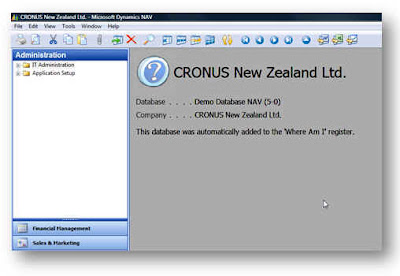
My form will look for details in the setup table matching the current company and database and if it doesn’t find a record, it creates one and displays the following image.
I then have a setup form that allows me to edit the info that’s going to be displayed.
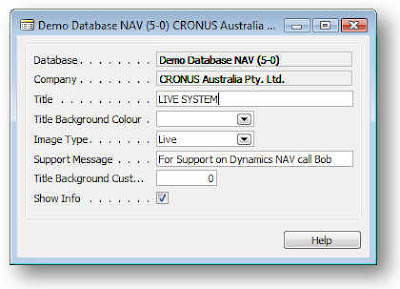
The Database and Company get filled in automatically. The Title field get’s displayed, the title Background Colour is an “unimplemented feature” :-)
The Image Type allows you to select from Live, Test and Unknown options which will show one of the following icons.
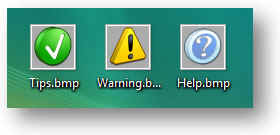
I downloaded these icons from http://tpdkcasimir.deviantart.com/ and made some adjustments to set the background colour to be the same as NAV’s background colour and resize them (when I say I did it, I mean someone with far more talent than me did it for me.)
Now this is where I hit the first weird NAVism – or maybe I was just doing something wrong. Whenever I put the icons on the form, they got stretched. Anyone know what I’m doing wrong? I thought at first that NAV had some kind of minimum size so I resized the Icons to fit the size of my NAV graphic and these got stretched again to look like this.
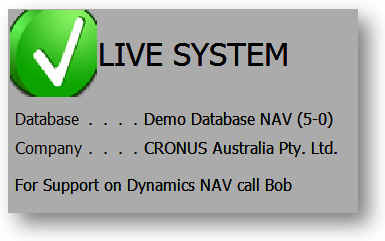
But at least you can see the idea – and the way the other data fields are being updated from the database.
The Support message appears at the bottom of the form, the Show Info tick allows you to suppress the message in certain company/database combinations – like maybe your live system. The custom background colour is another unimplemented feature.
I made a list form first and then decided a card form is a little easier to set up the data.
OK now let’s look at how I did this.
To start with, how am I going to solve the problem of my data not getting lost when I restore my live system? Well, there’s some other data that doesn’t get lost when you restore over your database in SQL and that’s the user license. The way the system keeps that is by storing it in a table called $ndo$srvproperty that lives in the master database. So I’m going to create a new table in the master database and use that to store details on my NAV databases/companies. Here’s the SQL to create the table and grant permission to public:
OK. So now we have a table we can work with. The next thing is that in each database I’m going to use this with, I’m going to need a view that references this table so NAV can access it via a linked table (you know that NAV can have linked tables that are based upon views which point to tables in other databases right?)
Here’s my code to create the view:
If you don’t create this view you won’t be able to compile the table in NAV since the table is a linked table.
Now you can import my objects into the database. Sorry for the massive amount of code but at least you can paste this into a text file and import it (I decided to stick the code at the end of the post rather than in the middle of this text.)
So we’re nearly there. The next thing is to add this code to your codeunit 1 CompanyOpen() function:
You’ll probably need to hack the code to change the path for the bitmaps and create the bitmap files in order to get the form to compile and obviously you must have the view created in the database before you can compile the table.
That’s it. Obviously there’s a whole heap of other things to do like to make the setup form accessible from somewhere (menu option.)
Sadly I couldn’t address the problem of being able to click on the Form and press ESC. I really want the form to stay in the background and never come to the front but I don’t think I can do this either.
So if anyone knows how to solve the these problems or feels like finishing it off, feel free to have a go – just post a comment and a link to wherever you post your stuff.
This still isn’t a great solution and I think Microsoft really need to add this as a standard feature – and make it so we can change something really useful like the window colour, etc.
Oh yer, this code is posted without warranty or guarantees. If you decide to try and implement this code and you break something – don’t call me.
Here's the code...
I really wanted to make a super-nice version of Waldo’s form but I came up short in a couple of areas. Who knows, maybe someone reading this blog will be able to offer some advice as to how to overcome the problems I found.
First of all, let me give you my requirements.
I want the system to provide immediate visual cues to show the users which database or company they happen to be in. The required information is to provide something eye-catching, to show a large bit of text (like “TEST SYSTEM”) and to provide the database name, company name and finally give me a big area where I can put a support message. Oh and one more thing: when I copy my database from the live system and restore it to my test database, I want the messages and visual cues to stay the same – that’s right, I don’t want to have to edit the data to make my test system say it’s the test system every time I restore it from the live backup.
The solution I came up with is pretty much based on Waldo’s solution so I’m not taking credit for this. I just figured, it would be nice to share this with anyone that’s interested and maybe someone with a bit more time can iron out the imperfections. I should also say that I only ever intended this to work with SQL databases so there’s no need to point out that this will not work with a native database.
Before we get stuck in to the How, let’s take a look at the solution I came up with. Like Waldo’s solution, I have some code in my CompanyOpen() trigger in codeunit 1 ApplicationManagement that will launch a form.
My form will look for details in the setup table matching the current company and database and if it doesn’t find a record, it creates one and displays the following image.

I then have a setup form that allows me to edit the info that’s going to be displayed.

The Database and Company get filled in automatically. The Title field get’s displayed, the title Background Colour is an “unimplemented feature” :-)
The Image Type allows you to select from Live, Test and Unknown options which will show one of the following icons.

I downloaded these icons from http://tpdkcasimir.deviantart.com/ and made some adjustments to set the background colour to be the same as NAV’s background colour and resize them (when I say I did it, I mean someone with far more talent than me did it for me.)
Now this is where I hit the first weird NAVism – or maybe I was just doing something wrong. Whenever I put the icons on the form, they got stretched. Anyone know what I’m doing wrong? I thought at first that NAV had some kind of minimum size so I resized the Icons to fit the size of my NAV graphic and these got stretched again to look like this.

But at least you can see the idea – and the way the other data fields are being updated from the database.
The Support message appears at the bottom of the form, the Show Info tick allows you to suppress the message in certain company/database combinations – like maybe your live system. The custom background colour is another unimplemented feature.
I made a list form first and then decided a card form is a little easier to set up the data.
OK now let’s look at how I did this.
To start with, how am I going to solve the problem of my data not getting lost when I restore my live system? Well, there’s some other data that doesn’t get lost when you restore over your database in SQL and that’s the user license. The way the system keeps that is by storing it in a table called $ndo$srvproperty that lives in the master database. So I’m going to create a new table in the master database and use that to store details on my NAV databases/companies. Here’s the SQL to create the table and grant permission to public:
USE [master]
GO
/****** Object:  Table [dbo].[IntergenNAVWhereAmI]    Script Date: 05/09/2008 20:06:19 ******/
SET ANSI_NULLS ON
GO
SET QUOTED_IDENTIFIER ON
GO
SET ANSI_PADDING ON
GO
CREATE TABLE [dbo].[IntergenNAVWhereAmI](
 [timestamp] [timestamp] NOT NULL,
 [Database] [varchar](30) NOT NULL,
 [Company] [varchar](30) NOT NULL,
 [Title] [varchar](50) NOT NULL,
 [Title Background Colour] [int] NOT NULL,
 [Image Type] [int] NOT NULL,
 [Support Message] [varchar](250) NOT NULL,
 [Title Background Custom Colour] [int] NOT NULL,
 [Show Info] [tinyint] NOT NULL,
 CONSTRAINT [IntergenNAVWhereAmI$0] PRIMARY KEY CLUSTERED
(
 [Database] ASC,
 [Company] ASC
)WITH (PAD_INDEX  = OFF, STATISTICS_NORECOMPUTE  = OFF, IGNORE_DUP_KEY = OFF, ALLOW_ROW_LOCKS  = ON, ALLOW_PAGE_LOCKS  = ON) ON [PRIMARY]
) ON [PRIMARY]
GO
GRANT SELECT, DELETE, INSERT, UPDATE ON IntergenNAVWhereAmI TO PUBLIC
GO
SET ANSI_PADDING OFF
OK. So now we have a table we can work with. The next thing is that in each database I’m going to use this with, I’m going to need a view that references this table so NAV can access it via a linked table (you know that NAV can have linked tables that are based upon views which point to tables in other databases right?)
Here’s my code to create the view:
USE [Demo Database NAV (5-0)]
GO
/****** Object:  View [dbo].[Intergen NAV Where Am I]    Script Date: 05/09/2008 20:04:35 ******/
SET ANSI_NULLS ON
GO
SET QUOTED_IDENTIFIER ON
GO
CREATE VIEW [dbo].[Intergen NAV Where Am I] AS
SELECT [timestamp]
      ,[Database]
      ,[Company]
      ,[Title]
      ,[Title Background Colour]
      ,[Image Type]
      ,[Support Message]
      ,[Title Background Custom Colour]
   ,[Show Info]
  FROM [master].[dbo].[IntergenNAVWhereAmI]
If you don’t create this view you won’t be able to compile the table in NAV since the table is a linked table.
Now you can import my objects into the database. Sorry for the massive amount of code but at least you can paste this into a text file and import it (I decided to stick the code at the end of the post rather than in the middle of this text.)
So we’re nearly there. The next thing is to add this code to your codeunit 1 CompanyOpen() function:
IF GUIALLOWED THEN
  FORM.RUN(FORM::"Where Am I");
You’ll probably need to hack the code to change the path for the bitmaps and create the bitmap files in order to get the form to compile and obviously you must have the view created in the database before you can compile the table.
That’s it. Obviously there’s a whole heap of other things to do like to make the setup form accessible from somewhere (menu option.)
Sadly I couldn’t address the problem of being able to click on the Form and press ESC. I really want the form to stay in the background and never come to the front but I don’t think I can do this either.
So if anyone knows how to solve the these problems or feels like finishing it off, feel free to have a go – just post a comment and a link to wherever you post your stuff.
This still isn’t a great solution and I think Microsoft really need to add this as a standard feature – and make it so we can change something really useful like the window colour, etc.
Oh yer, this code is posted without warranty or guarantees. If you decide to try and implement this code and you break something – don’t call me.
Here's the code...
OBJECT Table 50500 Intergen NAV Where Am I
{
OBJECT-PROPERTIES
{
Date=08/05/08;
Time=[ 2:37:12 PM];
Modified=Yes;
Version List=;
}
PROPERTIES
{
DataPerCompany=No;
LinkedObject=Yes;
}
FIELDS
{
{ 1 ; ;Database ;Text30 }
{ 2 ; ;Company ;Text30 }
{ 3 ; ;Title ;Text50 }
{ 4 ; ;Title Background Colour;Option ;OptionString=[ ,Green,Red,Yellow,Custom] }
{ 5 ; ;Image Type ;Option ;OptionString=[ ,Live,Test,Unknown] }
{ 6 ; ;Support Message ;Text250 }
{ 7 ; ;Title Background Custom Colour;Integer }
{ 8 ; ;Show Info ;Boolean }
}
KEYS
{
{ ;Database,Company ;Clustered=Yes }
}
CODE
{
BEGIN
END.
}
}
OBJECT Form 50500 Where Am I Setup List
{
OBJECT-PROPERTIES
{
Date=08/05/08;
Time=[ 2:38:09 PM];
Modified=Yes;
Version List=;
}
PROPERTIES
{
Width=16500;
Height=6710;
TableBoxID=1000000000;
SourceTable=Table50500;
}
CONTROLS
{
{ 1000000000;TableBox;220 ;220 ;16060;5500 ;HorzGlue=Both;
VertGlue=Both }
{ 1000000001;TextBox;0 ;0 ;4400 ;0 ;HorzGlue=Both;
ParentControl=1000000000;
InColumn=Yes;
SourceExpr=Database }
{ 1000000002;Label ;0 ;0 ;0 ;0 ;ParentControl=1000000001;
InColumnHeading=Yes }
{ 1000000003;TextBox;0 ;0 ;4400 ;0 ;ParentControl=1000000000;
InColumn=Yes;
SourceExpr=Company }
{ 1000000004;Label ;0 ;0 ;0 ;0 ;ParentControl=1000000003;
InColumnHeading=Yes }
{ 1000000018;CheckBox;8202;770 ;1700 ;440 ;ParentControl=1000000000;
InColumn=Yes;
ShowCaption=No;
SourceExpr="Show Info" }
{ 1000000019;Label ;0 ;0 ;0 ;0 ;ParentControl=1000000018;
InColumnHeading=Yes }
{ 1000000005;TextBox;0 ;0 ;4400 ;0 ;ParentControl=1000000000;
InColumn=Yes;
SourceExpr=Title }
{ 1000000006;Label ;0 ;0 ;0 ;0 ;ParentControl=1000000005;
InColumnHeading=Yes }
{ 1000000007;TextBox;0 ;0 ;3157 ;0 ;ParentControl=1000000000;
InColumn=Yes;
SourceExpr="Title Background Colour" }
{ 1000000008;Label ;0 ;0 ;0 ;0 ;ParentControl=1000000007;
InColumnHeading=Yes }
{ 1000000013;TextBox;16333;0 ;4400 ;0 ;ParentControl=1000000000;
InColumn=Yes;
SourceExpr="Title Background Custom Colour" }
{ 1000000014;Label ;0 ;0 ;0 ;0 ;ParentControl=1000000013;
InColumnHeading=Yes }
{ 1000000009;TextBox;0 ;0 ;1980 ;0 ;ParentControl=1000000000;
InColumn=Yes;
SourceExpr="Image Type" }
{ 1000000010;Label ;0 ;0 ;0 ;0 ;ParentControl=1000000009;
InColumnHeading=Yes }
{ 1000000011;TextBox;0 ;0 ;4400 ;0 ;ParentControl=1000000000;
InColumn=Yes;
SourceExpr="Support Message" }
{ 1000000012;Label ;0 ;0 ;0 ;0 ;ParentControl=1000000011;
InColumnHeading=Yes }
{ 1000000015;CommandButton;9240;5940;2200;550;
HorzGlue=Right;
VertGlue=Bottom;
Default=Yes;
PushAction=LookupOK;
InvalidActionAppearance=Hide }
{ 1000000016;CommandButton;11660;5940;2200;550;
HorzGlue=Right;
VertGlue=Bottom;
Cancel=Yes;
PushAction=LookupCancel;
InvalidActionAppearance=Hide }
{ 1000000017;CommandButton;14080;5940;2200;550;
HorzGlue=Right;
VertGlue=Bottom;
PushAction=FormHelp }
}
CODE
{
BEGIN
END.
}
}
OBJECT Form 50501 Where Am I
{
OBJECT-PROPERTIES
{
Date=09/05/08;
Time=[ 7:52:40 PM];
Modified=Yes;
Version List=;
}
PROPERTIES
{
XPos=0;
YPos=0;
Width=17270;
Height=5060;
Editable=No;
BackColor=11250603;
BorderStyle=None;
CaptionBar=None;
Minimizable=No;
Maximizable=No;
Sizeable=No;
SaveControlInfo=No;
SavePosAndSize=No;
SaveColumnWidths=No;
InsertAllowed=No;
DeleteAllowed=No;
ModifyAllowed=No;
SaveTableView=No;
OnOpenForm=BEGIN
SetDetails();
END;
OnQueryCloseForm=VAR
l_ApplicationManagement@1000000000 : Codeunit 1;
BEGIN
//MESSAGE(FORMAT(l_ApplicationManagement.CanInfoFormClose));
END;
}
CONTROLS
{
{ 1000000009;Frame ;0 ;0 ;17270;5060 ;Focusable=No;
ShowCaption=No;
Border=No }
{ 1000000001;Image ;0 ;0 ;2310 ;2310 ;Name=Tick;
ParentControl=1000000009;
InFrame=Yes;
Bitmap=C:\Users\davidr\Desktop\tips.bmp }
{ 1000000000;Image ;0 ;0 ;2310 ;2310 ;Name=Warning;
ParentControl=1000000009;
InFrame=Yes;
Bitmap=C:\Users\davidr\Desktop\Warning.bmp }
{ 1000000002;Image ;0 ;0 ;2310 ;2310 ;Name=Question;
ParentControl=1000000009;
InFrame=Yes;
Bitmap=C:\Users\davidr\Desktop\Help.bmp;
OnPush=VAR
l_IntergenNAVWhereAmI@1000000001 : Record 50500;
BEGIN
END;
}
{ 1000000005;TextBox;3520 ;2530 ;7260 ;660 ;Editable=No;
Focusable=No;
ParentControl=1000000009;
InFrame=Yes;
Border=No;
FontSize=12;
CaptionML=ENZ=Database;
SourceExpr=g_DatabaseName }
{ 1000000006;Label ;110 ;2530 ;3300 ;660 ;ParentControl=1000000005;
FontSize=12 }
{ 1000000003;TextBox;2310 ;0 ;14850;2310 ;Name=Title;
Editable=No;
Focusable=No;
ParentControl=1000000009;
InFrame=Yes;
BackTransparent=Yes;
Border=No;
FontSize=24;
SourceExpr=g_Title }
{ 1000000004;TextBox;3520 ;3300 ;7260 ;660 ;Editable=No;
Focusable=No;
ParentControl=1000000009;
InFrame=Yes;
Border=No;
FontSize=12;
CaptionML=ENZ=Company;
SourceExpr=g_CompanyName }
{ 1000000007;Label ;110 ;3300 ;3300 ;660 ;ParentControl=1000000004;
FontSize=12 }
{ 1000000008;TextBox;110 ;4290 ;17050;660 ;Editable=No;
Focusable=No;
ParentControl=1000000009;
InFrame=Yes;
Border=No;
FontSize=12;
CaptionML=ENZ=Database;
SourceExpr=g_SupportMessage }
}
CODE
{
VAR
g_Title@1000000000 : Text[50];
g_DatabaseName@1000000001 : Text[50];
g_CompanyName@1000000002 : Text[50];
g_SupportMessage@1000000003 : Text[250];
PROCEDURE SetDetails@1000000001();
VAR
l_IntergenNAVWhereAmI@1000000001 : Record 50500;
l_Session@1000000000 : Record 2000000009;
BEGIN
CurrForm.Tick.VISIBLE(FALSE);
CurrForm.Warning.VISIBLE(FALSE);
CurrForm.Question.VISIBLE(FALSE);
l_Session.SETRANGE("My Session", TRUE);
IF l_Session.FINDFIRST THEN
g_DatabaseName := l_Session."Database Name"
ELSE
g_DatabaseName := 'Database Not Found!';
g_CompanyName := COMPANYNAME;
IF NOT l_IntergenNAVWhereAmI.GET(g_DatabaseName, g_CompanyName) THEN BEGIN
l_IntergenNAVWhereAmI.Database := g_DatabaseName;
l_IntergenNAVWhereAmI.Company := g_CompanyName;
l_IntergenNAVWhereAmI."Image Type" := l_IntergenNAVWhereAmI."Image Type"::Unknown;
l_IntergenNAVWhereAmI.Title := g_CompanyName;
l_IntergenNAVWhereAmI."Title Background Colour" := l_IntergenNAVWhereAmI."Title Background Colour"::" ";
l_IntergenNAVWhereAmI."Image Type" := l_IntergenNAVWhereAmI."Image Type"::Unknown;
l_IntergenNAVWhereAmI."Support Message" := 'This database was automatically added to the ''Where Am I'' register.';
l_IntergenNAVWhereAmI."Show Info" := TRUE;
l_IntergenNAVWhereAmI.INSERT;
END ELSE
IF NOT l_IntergenNAVWhereAmI."Show Info" THEN
CurrForm.CLOSE;
CASE l_IntergenNAVWhereAmI."Image Type" OF
l_IntergenNAVWhereAmI."Image Type"::Live :
BEGIN
CurrForm.Tick.VISIBLE(TRUE);
END;
l_IntergenNAVWhereAmI."Image Type"::Test :
BEGIN
CurrForm.Warning.VISIBLE(TRUE);
END;
l_IntergenNAVWhereAmI."Image Type"::Unknown :
BEGIN
CurrForm.Question.VISIBLE(TRUE);
END;
END;
g_Title := l_IntergenNAVWhereAmI.Title;
g_SupportMessage := l_IntergenNAVWhereAmI."Support Message";
END;
BEGIN
END.
}
}
OBJECT Form 50502 Where Am I Setup Card
{
OBJECT-PROPERTIES
{
Date=08/05/08;
Time=[ 5:15:14 PM];
Modified=Yes;
Version List=;
}
PROPERTIES
{
Width=9790;
Height=6160;
InsertAllowed=No;
DeleteAllowed=No;
SourceTable=Table50500;
}
CONTROLS
{
{ 1 ;Frame ;220 ;220 ;9350 ;4950 ;HorzGlue=Both;
VertGlue=Both;
ShowCaption=No }
{ 2 ;TextBox ;3850 ;440 ;5500 ;440 ;Editable=No;
ParentControl=1;
InFrame=Yes;
SourceExpr=Database }
{ 3 ;Label ;440 ;440 ;3300 ;440 ;ParentControl=2 }
{ 4 ;TextBox ;3850 ;990 ;5500 ;440 ;Editable=No;
ParentControl=1;
InFrame=Yes;
SourceExpr=Company }
{ 5 ;Label ;440 ;990 ;3300 ;440 ;ParentControl=4 }
{ 6 ;TextBox ;3850 ;1540 ;5500 ;440 ;ParentControl=1;
InFrame=Yes;
SourceExpr=Title }
{ 7 ;Label ;440 ;1540 ;3300 ;440 ;ParentControl=6 }
{ 8 ;TextBox ;3850 ;2090 ;2750 ;440 ;ParentControl=1;
InFrame=Yes;
SourceExpr="Title Background Colour" }
{ 9 ;Label ;440 ;2090 ;3300 ;440 ;ParentControl=8 }
{ 10 ;TextBox ;3850 ;2640 ;2750 ;440 ;ParentControl=1;
InFrame=Yes;
SourceExpr="Image Type" }
{ 11 ;Label ;440 ;2640 ;3300 ;440 ;ParentControl=10 }
{ 12 ;TextBox ;3850 ;3190 ;5500 ;440 ;ParentControl=1;
InFrame=Yes;
SourceExpr="Support Message" }
{ 13 ;Label ;440 ;3190 ;3300 ;440 ;ParentControl=12 }
{ 14 ;TextBox ;3850 ;3740 ;1700 ;440 ;ParentControl=1;
InFrame=Yes;
SourceExpr="Title Background Custom Colour" }
{ 15 ;Label ;440 ;3740 ;3300 ;440 ;ParentControl=14 }
{ 16 ;CheckBox ;3850 ;4290 ;440 ;440 ;ParentControl=1;
InFrame=Yes;
ShowCaption=No;
SourceExpr="Show Info" }
{ 17 ;Label ;440 ;4290 ;3300 ;440 ;ParentControl=16 }
{ 18 ;CommandButton;7370 ;5390 ;2200 ;550 ;HorzGlue=Right;
VertGlue=Bottom;
PushAction=FormHelp }
}
CODE
{
BEGIN
END.
}
}
Wednesday, 12 March 2008
Dynamics NAV SQL Security Roles
I'm studying for the Installation and Configuration exam at the moment and have found some interesting stuff in the training material that I often need to know. I was recently asked about the SQL permissions needed to be able to create new users in Dynamics NAV and, thanks to my studies, was able to go straight to the right page in the document. I was interested to see that this topic also recently surfaced again in the DynamicsUser forum. This table is for Dynamics NAV 5.0.
Invoking the synchronization process or modifying the User table
sysadmin server role. Alternatively both a member of the securityadmin server role and a member of the db_owner database role for this database.
Creating a database
sysadmin or dbcreator server role. Alternatively, the user must have been granted the create database permission. The user must also have public access to the model database.
Altering a database
sysadmin or dbcreator server role. Alternatively a member of the db_owner or db_ddladmin database role for this database.
Creating tables within a database
sysadmin server role or be a member of the db_owner database role for this database.
Now you could argue that you don't want to grant these SQL rights to the user just to let them add users to the ERP database. This raises an interesting question: which is better, giving a user db_owner role membership and securityadmin server role or knowing that any user of the application could potentially add other users to the database? Personally I like the thought that I can pick and chose which user gets these rights from a SQL administrator's role and not leave it up to the users of the ERP to decide.
Thursday, 28 February 2008
SIFTing through the CRUD
CRUD (Create, Read, Update, Delete) has to be one of my all time favourite computer acronyms. I also like PICNIC (Problem In Chair Not In Computer) but that's a whole different story.
SIFT (Sum-Index Flow Technology) is a clever trick used by NAV to give you incredibly fast displays of aggregated totals. The Net Change and Balance fields on the Chart of Accounts screen are probably the best known examples. These fields are instantly drawn and can be filtered by dimension, posting date, etc. I have not seen this in the other ERP systems I have used and it is pretty impressive and powerful. However, with great power comes great responsibility and SIFT has its price. To get this fast performance, NAV makes a trade and instead of doing the work at the time of reading the data, NAV does the work when you create, update or delete the data. This can be OK for records that are not updated very often but you do need to be careful how many FlowFields and SumIndexes you add to tables. There's no such thing as a free lunch (unless of course you work in sales.)
I recently tried to make an update on a table with a relatively large number of records. My SQL script was simple and all it did was set one field to be the product of another two fields (e.g. Line Amount = Qty * Price). The dataset being updated contained just over 2 million records and I killed the query after 3 hours of execution. I couldn't understand why the thing was taking so long. Then I remembered SIFT! I don't pretend to be a SQL expert and there are lots of clever people out there that have written lots of clever stuff on database optimisation but what I do know is that even if my SIFT update takes a fraction of a second then 2 million fractions of a second can be several hours.
When you have a SIFT index on a table, NAV adds a SQL Trigger to the table with lots of fancy SQL code to update a number of SIFT tables with the aggregated totals. Fortunately, NAV provides the ability to disable the maintenance of SIFT tables in SQL. You can also fine-tune how many levels of data should be maintained which can again improve performance. When you go into the table designer and view the keys you can show an extra column called MaintainSIFTIndex. I went into my table designer and un-ticked this field for the SumIndex keys that were totalling the field I was updating. I compiled the table which dropped the table trigger that maintains the SIFT tables and deleted the SIFT table.
I then ran my SQL query again. It completed in 8 minutes!
I went back in to the table designer and re-activated my SIFT maintenance option and re-compiled. NAV put the triggers back and re-created my totals. This took 5 minutes. As you may know reads are the least expensive type of database operation with inserts, updates and deletes being considerably more time consuming. It is much faster to get the sum index totals updated all in one go rather than bit by bit over and over for every record that is updated.
I also have a data-conversion routine for a NAV upgrade that takes a very long time to execute – the next time I run it I am going to disable my SIFT maintenance on the tables first (and possibly disable the SQL maintenance of some of the indexes which also add time to transactions). Once the routine has completed I will rebuild the indexes and SIFT tables – it will be interesting to see how much of a performance gain I get by doing this.
I see from the posting on the Sustained Engineering Team Blog that the imminent SP1 release for NAV 5.0 will allow the Indexed Views feature of SQL 2005 to be used for SIFT instead of the current method. It will be interesting to see what affect this has on performance.
Saturday, 23 February 2008
SQL Error when Importing FOB file.
I frequently get support calls from customers that get an error message similar to the following when trying to import a FOB that includes changes to tables:
The following SQL Server error(s) occurred while accessing the TestTable table: 1088,"42000",[Microsoft][ODBC SQL Server Driver][SQL Server]Cannot find the object "Cronus New Zealand Ltd_$TestTable" because it does not exist or you do not have permissions.
SQL:
ALTER TABLE "DATABASENAME"."dbo"." Cronus New Zealand Ltd_$TestTable" ALTER COLUMN "Message" VARCHAR(240) NOT NULL
The solution is simple and can be found in the standard documentation. In order to be able to make changes to table definitions, you need to be a member of the sysadmin server role or be a member of the db_owner database role for this database.
You may need to ask your SQL database administrator to grant these privileges to your user account and it is likely they will grant you the lower db_owner privileges rather than sysadmin and still grumble about it.
OK problem solved. Everyone’s happy, but…
If you’re anything like me, you may wonder why this is the case. Why do you need to be granted special rights by a database administrator for this task when all other rights are granted to you from within the NAV application? To be able to answer this question we need to understand a little bit about how NAV users access the database.
I first came across this issue when trying to access the NAV SQL database from other applications (such as Excel or Reporting Services) and I soon discovered that my NAV login did not allow me access to the data contained in the NAV database. New users added to Dynamics NAV through the NAV application will have no permissions on the database (well actually the user has been granted the public database role which means they have permission to connect to the database but not to do anything else.)
Incidentally, when you create a Windows login (as opposed to a Database Login) from the Dynamics NAV client, the system will create the SQL Login and map the user to the database with the public role. If you are trying to use a Database login, you must create the SQL Login first through SQL Server Management Studio.
So the question remains: how can we read the data from the tables when we have no rights to read the data? The magic happens through something called an “Application Server Role”. If you look under Security for the database you are using in SQL Server Management Studio, you will see groups for Users, Roles, Schemas, Asymmetric Keys, Certificates and Symmetric Keys. Open the Roles and then expand the Application Roles and you will one called $ndo$shadow. This role has all the permissions needed to read from every table in the NAV database.
An application server role is used to solve exactly the problem we are investigating, that is, how can you give users full access to a SQL database through your application (in this case NAV) but not let them do anything when they try and use Excel to query the data? Since security is controlled by NAV, when the user tries to access the data directly they are by-passing the permissions that have been given to them by the NAV security administrator.
The $ndo$shadow application server role is created by the application and is given a password that is too big for users to remember even if they knew how to find it. When the user runs the application, one of the first things that NAV does is run a stored procedure to set the application server role for the current session using this big password. The SQL documentation tells us that this will allow the user to use the rights allocated to the application server role for the current session until the session is terminated.
In a mysterious move, Microsoft changed this security model in version 4.0 and introduced a whole bunch of $ndo$shadow application server roles with a funny GUID thing on the end. It looks like these new roles were used for each user instead of having one for all users. I am a bit unsure as to how these roles worked since they didn’t actually work very well and I soon stopped using them. Any changes to security needed to be synchronized to these roles and many users complained of the system locking up for long periods of time. In 4.0 SP3 (I think) Microsoft introduced the ability to switch this new security mode off and revert to the good old single $ndo$shadow role for everyone. Interestingly the option allows you to select your security as being either “Enhanced” or “Standard”. I think they would have been better off calling these options “Rubbish” and “The one that works”.
So now we know how we get access to the data when our user account doesn’t have any rights, but the question of why we need dbo rights on a user account (that is not being used) to change tables is still unanswered.
I spent a few hours trying to figure this out using SQL Profiler and stepping through various scenarios. After a long frustrating session, I gave up and went to bed. Then I figured it out. Before NAV changes to use the $ndo$shadow application server role, it first checks to see if your user is a dbo and if you are a dbo it doesn’t switch to the application server role. Simple really – but worth noting that if you are a dbo, you are using your own credentials and permissions and not those of the application server role so adding permissions to the $ndo$shadow role will have no effect.
The following SQL Server error(s) occurred while accessing the TestTable table: 1088,"42000",[Microsoft][ODBC SQL Server Driver][SQL Server]Cannot find the object "Cronus New Zealand Ltd_$TestTable" because it does not exist or you do not have permissions.
SQL:
ALTER TABLE "DATABASENAME"."dbo"." Cronus New Zealand Ltd_$TestTable" ALTER COLUMN "Message" VARCHAR(240) NOT NULL
The solution is simple and can be found in the standard documentation. In order to be able to make changes to table definitions, you need to be a member of the sysadmin server role or be a member of the db_owner database role for this database.
You may need to ask your SQL database administrator to grant these privileges to your user account and it is likely they will grant you the lower db_owner privileges rather than sysadmin and still grumble about it.
OK problem solved. Everyone’s happy, but…
If you’re anything like me, you may wonder why this is the case. Why do you need to be granted special rights by a database administrator for this task when all other rights are granted to you from within the NAV application? To be able to answer this question we need to understand a little bit about how NAV users access the database.
I first came across this issue when trying to access the NAV SQL database from other applications (such as Excel or Reporting Services) and I soon discovered that my NAV login did not allow me access to the data contained in the NAV database. New users added to Dynamics NAV through the NAV application will have no permissions on the database (well actually the user has been granted the public database role which means they have permission to connect to the database but not to do anything else.)
Incidentally, when you create a Windows login (as opposed to a Database Login) from the Dynamics NAV client, the system will create the SQL Login and map the user to the database with the public role. If you are trying to use a Database login, you must create the SQL Login first through SQL Server Management Studio.
So the question remains: how can we read the data from the tables when we have no rights to read the data? The magic happens through something called an “Application Server Role”. If you look under Security for the database you are using in SQL Server Management Studio, you will see groups for Users, Roles, Schemas, Asymmetric Keys, Certificates and Symmetric Keys. Open the Roles and then expand the Application Roles and you will one called $ndo$shadow. This role has all the permissions needed to read from every table in the NAV database.
An application server role is used to solve exactly the problem we are investigating, that is, how can you give users full access to a SQL database through your application (in this case NAV) but not let them do anything when they try and use Excel to query the data? Since security is controlled by NAV, when the user tries to access the data directly they are by-passing the permissions that have been given to them by the NAV security administrator.
The $ndo$shadow application server role is created by the application and is given a password that is too big for users to remember even if they knew how to find it. When the user runs the application, one of the first things that NAV does is run a stored procedure to set the application server role for the current session using this big password. The SQL documentation tells us that this will allow the user to use the rights allocated to the application server role for the current session until the session is terminated.
In a mysterious move, Microsoft changed this security model in version 4.0 and introduced a whole bunch of $ndo$shadow application server roles with a funny GUID thing on the end. It looks like these new roles were used for each user instead of having one for all users. I am a bit unsure as to how these roles worked since they didn’t actually work very well and I soon stopped using them. Any changes to security needed to be synchronized to these roles and many users complained of the system locking up for long periods of time. In 4.0 SP3 (I think) Microsoft introduced the ability to switch this new security mode off and revert to the good old single $ndo$shadow role for everyone. Interestingly the option allows you to select your security as being either “Enhanced” or “Standard”. I think they would have been better off calling these options “Rubbish” and “The one that works”.
So now we know how we get access to the data when our user account doesn’t have any rights, but the question of why we need dbo rights on a user account (that is not being used) to change tables is still unanswered.
I spent a few hours trying to figure this out using SQL Profiler and stepping through various scenarios. After a long frustrating session, I gave up and went to bed. Then I figured it out. Before NAV changes to use the $ndo$shadow application server role, it first checks to see if your user is a dbo and if you are a dbo it doesn’t switch to the application server role. Simple really – but worth noting that if you are a dbo, you are using your own credentials and permissions and not those of the application server role so adding permissions to the $ndo$shadow role will have no effect.
Monday, 26 November 2007
Reporting Services Divide by Zero Error in Report Expression
It’s a real pain – if I have a field that I want to calculate as one field divided by another, I have found that I get a divide by zero error when one of the fields is 0.
Normally, I would do a quick check on the field I am dividing by (the divisor) before using it in a calculation. In a field expression, the only way to include this kind of check is with an inline if statement. So I would have something like this in my report expression:
=IIF(Fields!Budget.Value = 0, "", Fields!Budget.Actual / Fields!Budget.Value)
But there is a problem with this. The False part of the IIF function still gets evaluated and your field shows #Error instead of a blank as expected.
There is a really simple way around this – create your own VB.NET function and call this from within the expression. Creating a VB.NET function is really easy as long as you are playing nicely in the sandbox (i.e. not trying to access any of the machine’s resources.) Here is a sample function that you can paste into the Code property of the report:
Public Shared Function VarPercent(ByVal Actual As Decimal, ByVal Budget As Decimal) As Decimal
If Budget = 0 Then
Return 0
End If
Return (Actual / Budget)
End Function
To use the function, just put the following in your expression:
=code.VarPercent(Fields!Actual.Value,Fields!Budget.Value)
That’s it!
If the divisor is 0, we return 0. We could of course return an empty string – although you can just as easily do this by formatting the field using a formatting expression that shows blank for zeros.
Normally, I would do a quick check on the field I am dividing by (the divisor) before using it in a calculation. In a field expression, the only way to include this kind of check is with an inline if statement. So I would have something like this in my report expression:
=IIF(Fields!Budget.Value = 0, "", Fields!Budget.Actual / Fields!Budget.Value)
But there is a problem with this. The False part of the IIF function still gets evaluated and your field shows #Error instead of a blank as expected.
There is a really simple way around this – create your own VB.NET function and call this from within the expression. Creating a VB.NET function is really easy as long as you are playing nicely in the sandbox (i.e. not trying to access any of the machine’s resources.) Here is a sample function that you can paste into the Code property of the report:
Public Shared Function VarPercent(ByVal Actual As Decimal, ByVal Budget As Decimal) As Decimal
If Budget = 0 Then
Return 0
End If
Return (Actual / Budget)
End Function
To use the function, just put the following in your expression:
=code.VarPercent(Fields!Actual.Value,Fields!Budget.Value)
That’s it!
If the divisor is 0, we return 0. We could of course return an empty string – although you can just as easily do this by formatting the field using a formatting expression that shows blank for zeros.
Tuesday, 2 October 2007
A useful SQL Tip - Coalesce.
I do a bit of Reporting Services work from NAV databases and recently a client wanted a list of Names to be presented as a comma delimited list.
Now I knew I had done this before and there was a really smart way of doing it but it took me a while to find it again. The trick is to use the coalesce function. You need to declare a variable to select into and then select from that so this is for use in a table-function or stored procedure.
Try this out in a NAV database when you have more than once company.
DECLARE @CompanyList VARCHAR(1000)
SELECT @CompanyList = COALESCE(@CompanyList + ', ', '') + Name
FROM Company
SELECT @CompanyList
Now I knew I had done this before and there was a really smart way of doing it but it took me a while to find it again. The trick is to use the coalesce function. You need to declare a variable to select into and then select from that so this is for use in a table-function or stored procedure.
Try this out in a NAV database when you have more than once company.
DECLARE @CompanyList VARCHAR(1000)
SELECT @CompanyList = COALESCE(@CompanyList + ', ', '') + Name
FROM Company
SELECT @CompanyList
Subscribe to:
Posts (Atom)

