There is a new training course available for download from PartnerSource and CustomerSource. I'm not the first to blog about this, but NAV 2009 is definitely a hot topic, and I only came across this today, so if I've missed it, I'm sure there are others out there that will be interested. The upcoming release of Microsoft's ERP solution is much anticipated and accounts for a significant number of hits on this blog from search engines. It's not possible to write much about the product but hopefully that will change when the next release is made in September.
If you have access to PartnerSource, you can view the training course contents and powerpoint at this link. The CustomerSource URL is here.
Sunday, 27 July 2008


Intergen in top 5% of Microsoft Dynamics Partners
Intergen has been honoured with membership of the 2008 Microsoft Dynamics President’s Club which consists of the top 5% of Microsoft Dynamics partners worldwide.
Intergen received this top recognition from Microsoft during the Microsoft Worldwide Partner Conference 2008 in Houston, Texas. The honour reflects Intergen’s dedication to meeting their clients’ needs.
It's a great feeling to be part of a team that is recognised at this level. To read more, visit http://www.scoop.co.nz/stories/SC0807/S00056.htm.
Intergen received this top recognition from Microsoft during the Microsoft Worldwide Partner Conference 2008 in Houston, Texas. The honour reflects Intergen’s dedication to meeting their clients’ needs.
It's a great feeling to be part of a team that is recognised at this level. To read more, visit http://www.scoop.co.nz/stories/SC0807/S00056.htm.
Tuesday, 22 July 2008
Where did I put that trigger?
I needed to put some SQL triggers on my NAV tables the other day and when I came to check which triggers existed today, I had forgotten how I did it originally.
Here's a quick SQL script that will show you all table triggers in the current database.
Here's a quick SQL script that will show you all table triggers in the current database.
SELECT [Trigger Name]=TRIG.name, [Table Name]=PARENT.name
FROM (select * from sys.all_objects where type = 'TR') TRIG
JOIN (select * from sys.all_objects) PARENT
ON TRIG.parent_object_id = PARENT.object_id
I love TRANSFERFIELDS.
I've been doing a fair bit of coding recently and I must admit I love the concept of transferfields and the simplicity. It's really nice to know that when a customer wants a field to work it's way through to the posted documents from the source documents, you can do it all without writing any code.
Still, it would be nice if there were a way of stopping it from going wrong.
Still, it would be nice if there were a way of stopping it from going wrong.
Friday, 27 June 2008
I hate TRANSFERFIELDS - Part II
I hate the TRANSFERFIELDS command. The last time I ranted about it I seemed to stir up some strong feelings, so I figured it’s time to bring this one up again.
Last time I commented on how the unsuspecting developer has no way of knowing what is going to happen when they use this command due to the way it copies fields between tables using the field ID to map the tables. Since then I have been tripped up again by this evil function and instead of simply moaning about it, I thought I would suggest an alternative.
So here I am going to introduce the all-new transferfields functionality. Microsoft, please feel free to take this idea and implement it in NAV.
The TRANSFERFIELDS command is programmed the same as now but in order to use it, a field mapping between the two tables must be defined at the table definition level. Let’s say we want to transfer fields from the Purchase Header table and the Purch. Inv. Header tables. You can find an example of this in the Purch.-Post codeunit as follows:
This line takes the fields from the PurchHeader record variable and transfers the fields to the fields with the same field ID in the PurchInvHeader record variable.
If you have not defined a filed mapping between these two tables, the above code will not compile. In order to define the mapping I see it working like this.
Go to edit the Purchase Header table and select View menu and select the Table Mappings option. This will launch a form similar to the following:
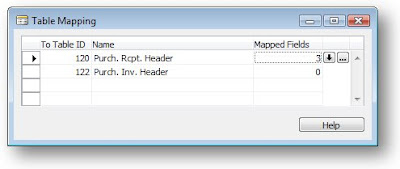
On this form, you can insert a new line and enter the To Table ID to identify the table you want to map to. It would probably make sense at this stage for the system to automatically insert mapping between the two tables based upon the matching field IDs of the two tables. In this respect replicating the existing behavior would be pretty easy.
To customize the field mappings for the tables, the user will simply click the assist edit button on the Mapped Fields field and this will show the Field Mapping form.
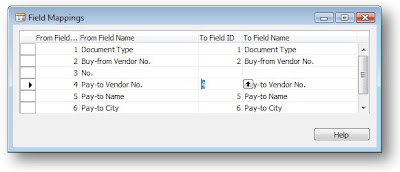
Here the user can set up the field mapping. There are a couple of great things about this approach, you can ignore fields that you would never want to copy, such as the No. field. You can also map fields with different IDs. The other great thing is that field mappings can be managed by end users without the need to write code. An example would be if the user creates a new custom field on the Purch. Inv. Header table called Original Purchase Order No. The user can then make sure that the purchase order number ends up in this field by just using the mappings.
We could even add some rules on what to do when the fields don’t match in type, i.e. should we truncate the string or throw a run-time error.
Last time I commented on how the unsuspecting developer has no way of knowing what is going to happen when they use this command due to the way it copies fields between tables using the field ID to map the tables. Since then I have been tripped up again by this evil function and instead of simply moaning about it, I thought I would suggest an alternative.
So here I am going to introduce the all-new transferfields functionality. Microsoft, please feel free to take this idea and implement it in NAV.
The TRANSFERFIELDS command is programmed the same as now but in order to use it, a field mapping between the two tables must be defined at the table definition level. Let’s say we want to transfer fields from the Purchase Header table and the Purch. Inv. Header tables. You can find an example of this in the Purch.-Post codeunit as follows:
PurchInvHeader.TRANSFERFIELDS(PurchHeader);
This line takes the fields from the PurchHeader record variable and transfers the fields to the fields with the same field ID in the PurchInvHeader record variable.
If you have not defined a filed mapping between these two tables, the above code will not compile. In order to define the mapping I see it working like this.
Go to edit the Purchase Header table and select View menu and select the Table Mappings option. This will launch a form similar to the following:

On this form, you can insert a new line and enter the To Table ID to identify the table you want to map to. It would probably make sense at this stage for the system to automatically insert mapping between the two tables based upon the matching field IDs of the two tables. In this respect replicating the existing behavior would be pretty easy.
To customize the field mappings for the tables, the user will simply click the assist edit button on the Mapped Fields field and this will show the Field Mapping form.

Here the user can set up the field mapping. There are a couple of great things about this approach, you can ignore fields that you would never want to copy, such as the No. field. You can also map fields with different IDs. The other great thing is that field mappings can be managed by end users without the need to write code. An example would be if the user creates a new custom field on the Purch. Inv. Header table called Original Purchase Order No. The user can then make sure that the purchase order number ends up in this field by just using the mappings.
We could even add some rules on what to do when the fields don’t match in type, i.e. should we truncate the string or throw a run-time error.
Monday, 23 June 2008
Help!
In May I wrote a short piece for MSDynamicsWorld.com on on-line help and offered some thoughts on how it could be improved. In response to this article, I received a question asking how to configure the online help in Dynamics NAV.
In truth I have never done this. I knew I had read a document on how to do it but to be honest, it looked so hard I didn't bother. When I came to reply with the details, I really struggled to find the document I was looking for that described the help creation process. If you're looking for it, it's called NOHG.pdf
One of my points in the article is that we really need an easy-to-use help editor, similar to the one in Dyamics AX. Doh! I can't believe I just admitted something was better in AX!
In truth I have never done this. I knew I had read a document on how to do it but to be honest, it looked so hard I didn't bother. When I came to reply with the details, I really struggled to find the document I was looking for that described the help creation process. If you're looking for it, it's called NOHG.pdf
One of my points in the article is that we really need an easy-to-use help editor, similar to the one in Dyamics AX. Doh! I can't believe I just admitted something was better in AX!
Error: [Microsoft][ODBC SQL Server Driver]Database is invalid or cannot be accessed State ID: HY024
What a great title for a blog post?
I got this error when a customer had tried updating their NAV 4.0 SP3 to use Standard security as opposed to Enhanced.
I suggested all sorts of fancy SQL to resolve the situation thinking it was a permissions error as I know that changing a database to use Standard causes some problems on permissions with the Session and Database File view.
It turns out the user had left the database in single user mode - a pre-requisite of being able to change the security model.
I used Activity Monitor in SQL 2005 Management Studio to kill the connected process, then logged in to NAV and used File, Database, Alter to remove the single user mode from the database. Problem sorted. But what about those missing permissions?
If you create a NAV database with standard security, the system will allocate permissions to the Database File and Session views to the application server role $ndo$shadow. However, if you change a database from Enhanced to use Standard, these permissions do not get assigned and you therefore hit errors unless you are a db_owner.
To resolve this you can grant the permissions yourself as follows:
I got this error when a customer had tried updating their NAV 4.0 SP3 to use Standard security as opposed to Enhanced.
I suggested all sorts of fancy SQL to resolve the situation thinking it was a permissions error as I know that changing a database to use Standard causes some problems on permissions with the Session and Database File view.
It turns out the user had left the database in single user mode - a pre-requisite of being able to change the security model.
I used Activity Monitor in SQL 2005 Management Studio to kill the connected process, then logged in to NAV and used File, Database, Alter to remove the single user mode from the database. Problem sorted. But what about those missing permissions?
If you create a NAV database with standard security, the system will allocate permissions to the Database File and Session views to the application server role $ndo$shadow. However, if you change a database from Enhanced to use Standard, these permissions do not get assigned and you therefore hit errors unless you are a db_owner.
To resolve this you can grant the permissions yourself as follows:
GRANT DELETE ON [dbo].[Database File] TO [$ndo$shadow]
GRANT INSERT ON [dbo].[Database File] TO [$ndo$shadow]
GRANT REFERENCES ON [dbo].[Database File] TO [$ndo$shadow]
GRANT SELECT ON [dbo].[Database File] TO [$ndo$shadow]
GRANT UPDATE ON [dbo].[Database File] TO [$ndo$shadow]
GRANT DELETE ON [dbo].[Session] TO [$ndo$shadow]
GRANT INSERT ON [dbo].[Session] TO [$ndo$shadow]
GRANT REFERENCES ON [dbo].[Session] TO [$ndo$shadow]
GRANT SELECT ON [dbo].[Session] TO [$ndo$shadow]
GRANT UPDATE ON [dbo].[Session] TO [$ndo$shadow]
Subscribe to:
Posts (Atom)

